Editor’s Note: Rhett Oldham, a history teacher at Ste. Genevieve Middle School in Missouri, is passionate about integrating technology into his classroom. Here he shares four ways to have students utilize their smartphones in class.
I teach in a middle school, which means a student’s personal phone is their most valuable asset, at least the way they see it. I want to leverage that enthusiasm by incorporating personal devices in my daily lessons in a multitude of ways. At Ste. Genevieve Middle School, we do not allow cell phones unless the teacher deems it part of a lesson, so when my kids walk into my classroom and see that a lesson has a phone activity, anticipation soars. By expanding our toolbox to include smartphones, teachers can create exciting lessons that seamlessly transition into meaningful learning while students have fun.
Snapchat
Snapchat is an app students love to use and I can see why...it is so versatile! I went to a workshop about using Snapchat to annotate books called, #Booksnaps—Snapping for Learning, and I was hooked. I now use one of the activities regularly in my classroom. At the beginning of the lesson, I ask my students to snapchat our learning targets. On Snapchat, you can underline words in different colors, find pictures that relate to the learning targets, and personalize the snap with a Bitmoji.

While students are working on their snaps, they are focused on finding the three most important words in the learning targets and talking to their friends about what they are finding. Recently, we had a class discussion on what the Egyptian flag looked while they were searching on Snapchat. We then looked for that flag on the ceiling of our classroom, which is covered with flags from around the world. Students are engaged in the material with a piece of technology that they are experts in using. This is a fun activity with 100 percent engagement.
Instagram and the World
My students talk to people all over the globe in my World History class. Global collaborations are an integral part of how I teach students about the world by facilitating connections with students in the country we are studying. I find these connections through Belouga, Google Communities (which is being phased out), connections with teachers at conferences, and through networking. Generally, we begin by introducing ourselves using a Padlet or Flipgrid, and then students begin to talk on Instagram or Snapchat. It needs to be noted here that my students go through digital citizenship lessons and sign an acknowledgement that they will use social media responsibly before we begin our collaborations.
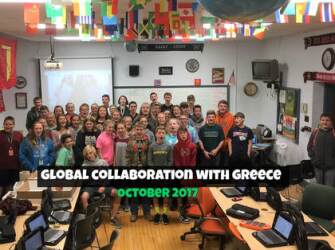
These global collaborations are truly the most impactful lessons I have ever taught and the use of social media is the linchpin. Ste. Genevieve Middle School Meets Greece is just one example. I have students talking to their new friends in Greece on the bus before school, in the bleachers while they watch a sporting event, or in the evening as they hang around the house. Students communicate so often because they want to. We conclude the collaboration with a “Breakfast Club” where students come in before school and participate in a Google Hangout with their new friends. The teachers abroad really like this activity because their students are interacting with native English speakers while my students are gaining experience talking to people around the world and understanding what it means to be global citizens. The benefits of students engaging with other students around the world are immeasurable.
We even took global collaboration one step further this summer when we visited the United Kingdom and stayed with the new friends that we met. Those students will return the visit and stay with us in October. Global collaboration at its best by creating lifelong friends.
Virtual Reality in the Classroom
Talking about history can be boring. Talking about places around the world and the people who lived there should never be boring. Virtual reality is something that I use seven to eight times a year, and when I do, the students have a great time with it. Google Cardboard virtual reality goggles are really cheap—a box of two can be bought for around $12.00, or a DIY kit can create the same thing for under $3.00. I use Google Expeditions and Nearpod most of the time when we go places, and I create a Google form for students to answer as we move from place to place.
On a side note, all YouTube videos can become virtual reality with just one click, providing you with endless possibilities. Students download the Google Expedition and Nearpod apps and then connect with you for a guided experience to anywhere in the world. Students can share if they don’t have a phone, which actually works better so the viewer can rest their eyes for a bit before engaging in the tour. Once again, this is a fun activity that makes lessons come alive.
That Phone Has a Camera!
Smartphones have great cameras, and I want my students integrating pictures in the lessons. Many times, I use the camera as a bridge between hands-on learning and technology, which makes the lesson even more fun and engaging. Here are three examples:
- The guy who invented Legos (its Ole Kirk Christiansen by the way) should be given a Nobel Prize! We love using Legos because they are versatile and allow for students to be creative. Recently, I had my students make creations based on the learning targets of a lesson on Mesopotamia. Students then walked around the room taking pictures of the other groups’ Lego creations and placed them in Google Slides and told a story.
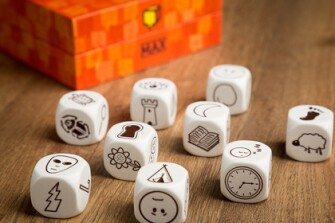
- I really like using Rory’s Story Cubes in my class. Rory’s Story Cubes are a pocket-sized creative story generator, providing hours of imaginative play for all ages. Simply roll the cubes and let the pictures spark your imagination. Students will take out their phones and snap a picture of the cubes and reference the picture as they write their story that incorporates the images on the cubes with the learning targets of the lesson. When students collaborate with each other, they show the picture and then tell the story. This activity really is “creative writing on steroids,” and the students have so much fun doing it.
We also use our phones as QR code readers when we do scavenger hunts in the school. Students will scan a QR code, revealing a clue or question. They can scan the codes with their personal phone or their computer. For example, we recently completed a scavenger hunt over terms that relate to the Constitution. Each location provided a question and a clue. As students found the answer, they rushed to the next location to answer the next question and the next clue. The top 3 teams received a prize providing they answered all the questions correctly. In this type of activity, students are moving around the building and having a great time learning, engaging in the material, and learning on their own terms.
Alternatives to Using Social Media
While using a personal smartphone is fun and really engages students, teachers do not want to leave out students who do not own a device. Google Drawings is my go-to place to create alternatives to social media and especially for creating graphic organizers. You can use them on the classroom laptops or you can print them off for students to complete. I have borrowed templates from Matt Miller at Ditch that Textbook and Eric Nelson at FanSchool, and I have also created some of my own templates. Feel free to use anything in the folder Dr. Oldham’s Cool Stuff so every student feels like they are part of the activity.
Often to our chagrin, smartphones are an important part of our students’ lives, but there is no reason to resist the magnetic pull of such a versatile device. Making the smartphone part of your teacher toolbox opens up many fun possibilities to both you and your students.
Connect with Rhett, Heather, and the Center for Global Education on Twitter.
All images taken by and used with permission of the author.